
ChatGPT 5.6 (GPT-5.6): Sol, Terra, and Luna — Everything You Need to Know
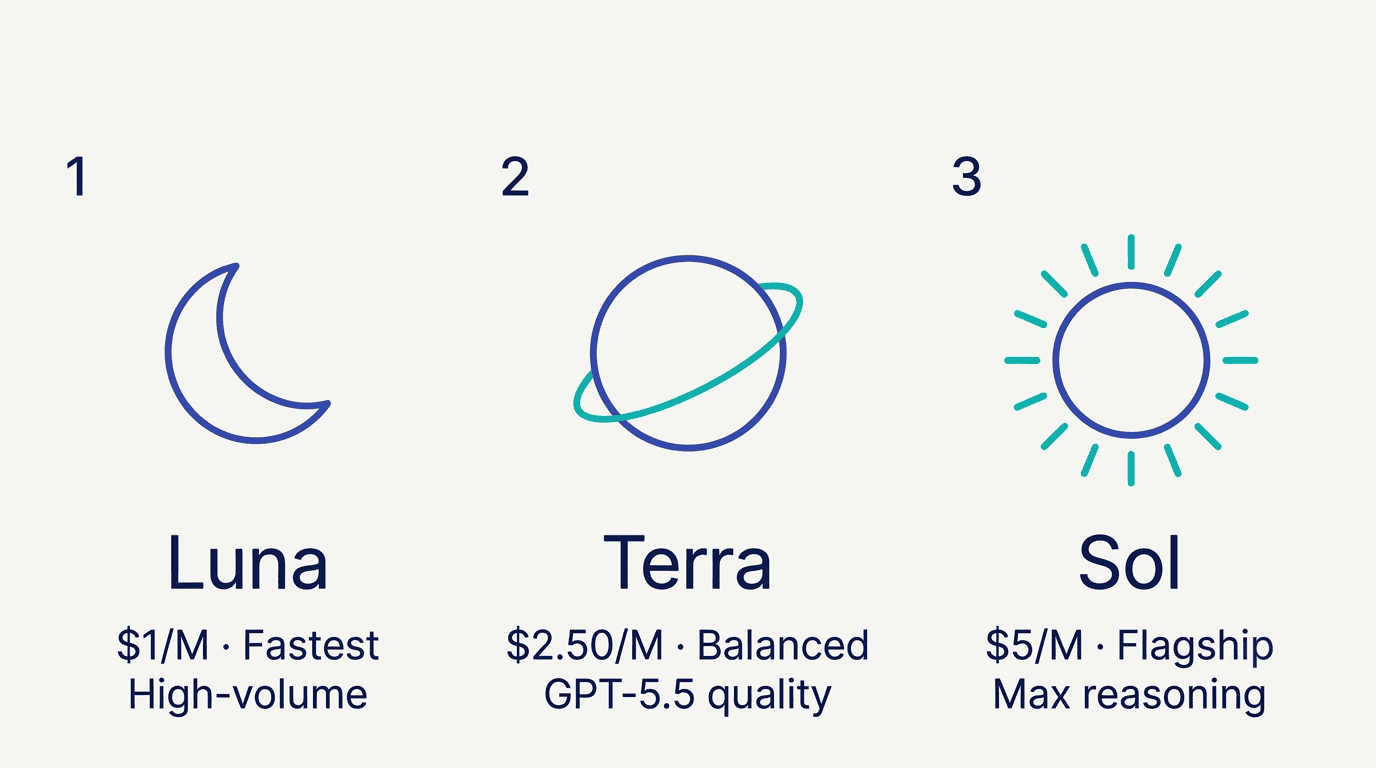
OpenAI released GPT-5.6 on July 9, 2026, as a three-tier model family — Sol, Terra, and Luna — all sharing a 1.05-million-token context window and a new pricing structure starting at $1 per million input tokens. GPT-5.6 is now available across ChatGPT, Codex, and the OpenAI API. The family is designed to cover every workload: Sol handles the hardest reasoning and coding tasks, Terra matches GPT-5.5 quality at roughly half the cost, and Luna targets fast, high-volume pipelines where price per token is the primary constraint. Despite the general availability announcement, GPT-5.5 Instant remains the default in standard ChatGPT — details that matter before migrating any workflow.
What Is GPT-5.6? Release Date and Background
GPT-5.6 — formally Generative Pre-trained Transformer 5.6 — is OpenAI’s newest model generation and a deliberate departure from the single-model convention used by predecessors. Rather than releasing one large model, OpenAI built three distinct capability tiers that share a common architecture, knowledge base, and context window.
The general availability launch date is July 9, 2026. A limited preview had opened on June 26, 2026 for a small group of trusted partners. The phased rollout was coordinated at the request of the U.S. government, which had concerns about the models’ elevated cybersecurity capabilities. This makes GPT-5.6 the first OpenAI model generation to undergo explicit pre-launch government coordination before general release.
What changed from GPT-5.5
GPT-5.5 Instant is not being deprecated — it remains the default for fast everyday responses in standard ChatGPT. GPT-5.6 runs alongside it as a parallel expansion. The main structural changes:
- Three permanent capability tiers (Sol, Terra, Luna) replace the single-model convention
- Two new reasoning controls —
maxandultra— push Sol beyond the standard compute ceiling - CEO Sam Altman stated that Sol is 54% more token-efficient for AI coding tasks versus previous versions
- Terra is competitive with GPT-5.5 while costing approximately half as much
- Programmatic Tool Calling and improved multi-agent orchestration are new for the API
Knowledge cutoff and specs shared by all three models
All three GPT-5.6 models share the same infrastructure parameters:
| Spec | Value |
|---|---|
| Knowledge cutoff | February 16, 2026 |
| Context window | 1,050,000 tokens (1.05M) |
| Max output | 128,000 tokens |
| Long-context threshold | 272,000 input tokens |
GPT-5.6 Sol vs Terra vs Luna: Tier Differences Explained
The naming convention in GPT-5.6 is new: the version number (5.6) marks the generation, and the name (Sol, Terra, Luna) marks the capability tier. Each tier can advance on its own release schedule — so future releases may update one tier without touching the others.
The plain API alias gpt-5.6 routes to gpt-5.6-sol, not to a router that selects among tiers automatically. Developers who want Terra or Luna must specify the model ID explicitly.
GPT-5.6 Sol — Flagship workhorse
Sol is the strongest model in the family and the one OpenAI benchmarks in every headline result. It is the only tier that unlocks two new reasoning controls:
max reasoning effort gives Sol the most compute time available to work through a single-agent problem. It is the appropriate setting when a task is difficult enough that a failed attempt would be expensive to redo.
ultra mode goes further by deploying subagents in parallel to accelerate complex multi-step tasks. The resulting variant — GPT-5.6 Sol Ultra — posts the family’s highest scores across benchmarks.
Sol is the preferred model for Microsoft Copilot 365 and powers ChatGPT Work. Best fit: complex reasoning, agentic coding, cybersecurity, scientific research, computer use, and high-value knowledge work. For a detailed breakdown of Sol’s benchmark scores and pricing, see the OpenAI Sol model guide.
GPT-5.6 Terra — Balanced everyday model
Terra is positioned as the practical default for professional workloads — GPT-5.5-level quality at roughly half the cost. On the Artificial Analysis Coding Agent Index it scores slightly above Anthropic’s Fable 5, placing it solidly mid-tier by capability while remaining the most cost-effective option for sustained production use.
Terra lacks the max and ultra reasoning controls available to Sol. Best fit: everyday professional work, analysis, routine coding help, document drafting, and balanced production routing. Compare Terra’s pricing against Sol in the OpenAI Terra model breakdown.
GPT-5.6 Luna — Fast, low-cost tier
Luna is the fastest and most affordable option, optimized for latency-sensitive or budget-sensitive pipelines. Despite being the cheapest tier, Luna outperforms Claude Opus 4.8 on the Artificial Analysis Coding Agent Index — “cheapest” does not mean “weakest” across all tasks.
Best fit: extraction, classification, first-draft generation, routing logic, and high-volume work that is easy to verify or retry. See latency benchmarks and use cases in the OpenAI Luna model guide.
GPT-5.6 Benchmarks: Sol, Terra, and Luna Performance Data
The GPT-5.6 family was evaluated across four main benchmark categories: coding agent performance, terminal workflows, advanced reasoning, and medical knowledge.
Coding: Artificial Analysis Coding Agent Index
| Model | Score |
|---|---|
| GPT-5.6 Sol | 80.0 |
| Anthropic Fable 5 | 77.2 |
| GPT-5.6 Terra | Just above Fable 5 |
| Claude Opus 4.8 | Below Terra |
| GPT-5.6 Luna | Above Claude Opus 4.8 |
Sol’s score of 80 is 2.8 points above Fable 5 — see the full GPT-5.6 vs Claude Fable 5 comparison for the head-to-head breakdown. OpenAI notes that Sol achieves this while using fewer than half the output tokens, completing tasks in less than half the time, and costing approximately one-third less than Fable 5. The efficiency gap is as significant as the accuracy gap.
Sol is 54% more token-efficient for AI coding tasks — a direct consequence of the architectural work we put into GPT-5.6 to make agentic loops less verbose and more precise.Sam Altman, CEO, OpenAI
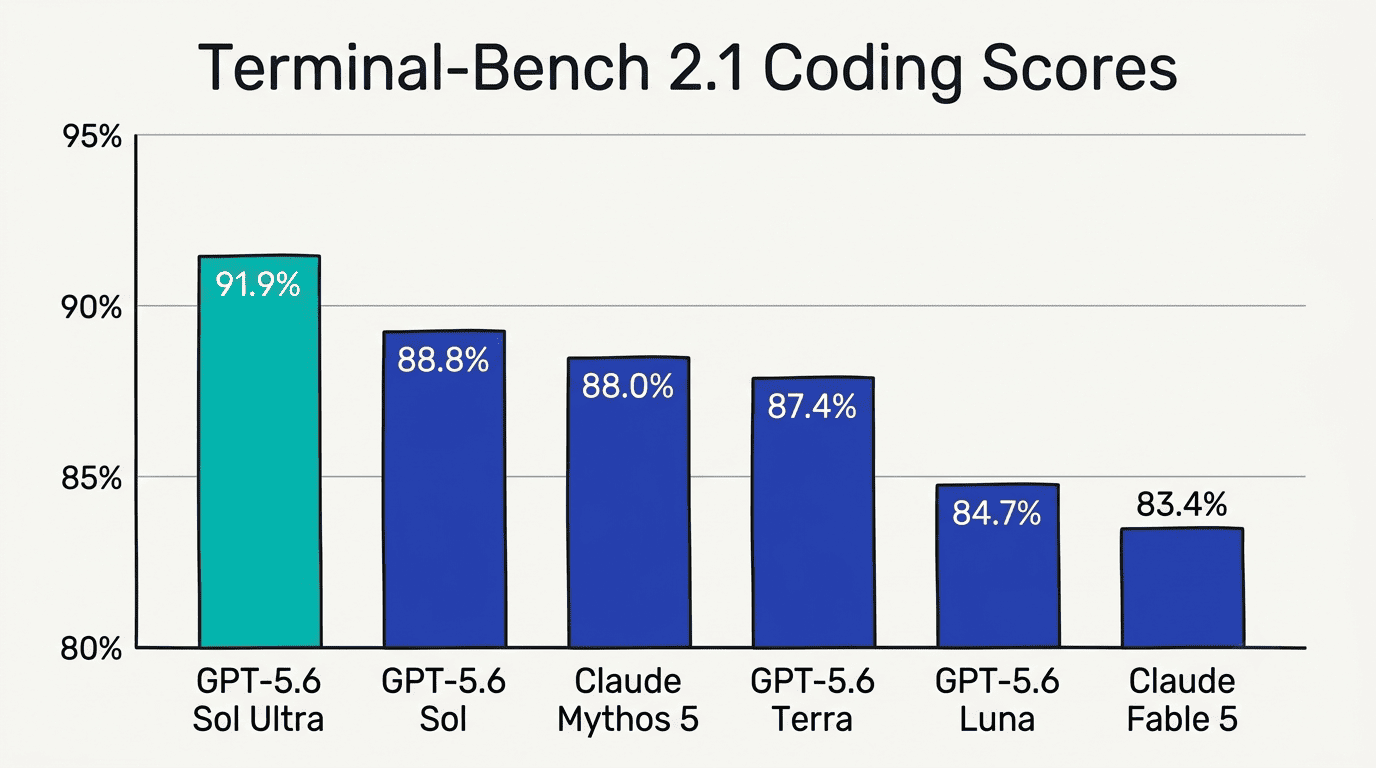
Coding: Terminal-Bench 2.1
Terminal-Bench 2.1 tests command-line workflows that require iteration, error recovery, and tool coordination — a closer proxy for real developer work than static coding puzzles.
| Model | Terminal-Bench 2.1 |
|---|---|
| GPT-5.6 Sol Ultra | 91.9% |
| GPT-5.6 Sol | 88.8% |
| Claude Mythos 5 | 88.0% |
| GPT-5.5 | 85.6% |
| GPT-5.6 Terra | 87.4% |
| GPT-5.6 Luna | 84.7% |
| Claude Fable 5 | 83.4% |
| Claude Opus 4.8 | 78.9% |
| Gemini 3.1 Pro Preview | 70.7% |
One notable result: on this benchmark, Claude Mythos 5 ties GPT-5.5 at the top of the competitor group, while Terra (87.4%) outscores GPT-5.5 (85.6%) — consistent with OpenAI’s “competitive with GPT-5.5 overall” positioning for Terra.
Reasoning and Health
On Agents’ Last Exam, GPT-5.6 Sol scores 52.7% versus GPT-5.5’s 46.9% — a 5.8-point improvement on one of the most demanding multi-step reasoning evaluations available.
On HealthBench Professional (length-adjusted), Sol scores 60.5 (+8.7 versus GPT-5.5), Terra scores 57.7, and Luna scores 55.7. All three GPT-5.6 tiers outperform GPT-5.5’s baseline of 51.8 on this benchmark.
GPT-5.6 Pricing: API Costs and Long-Context Rates
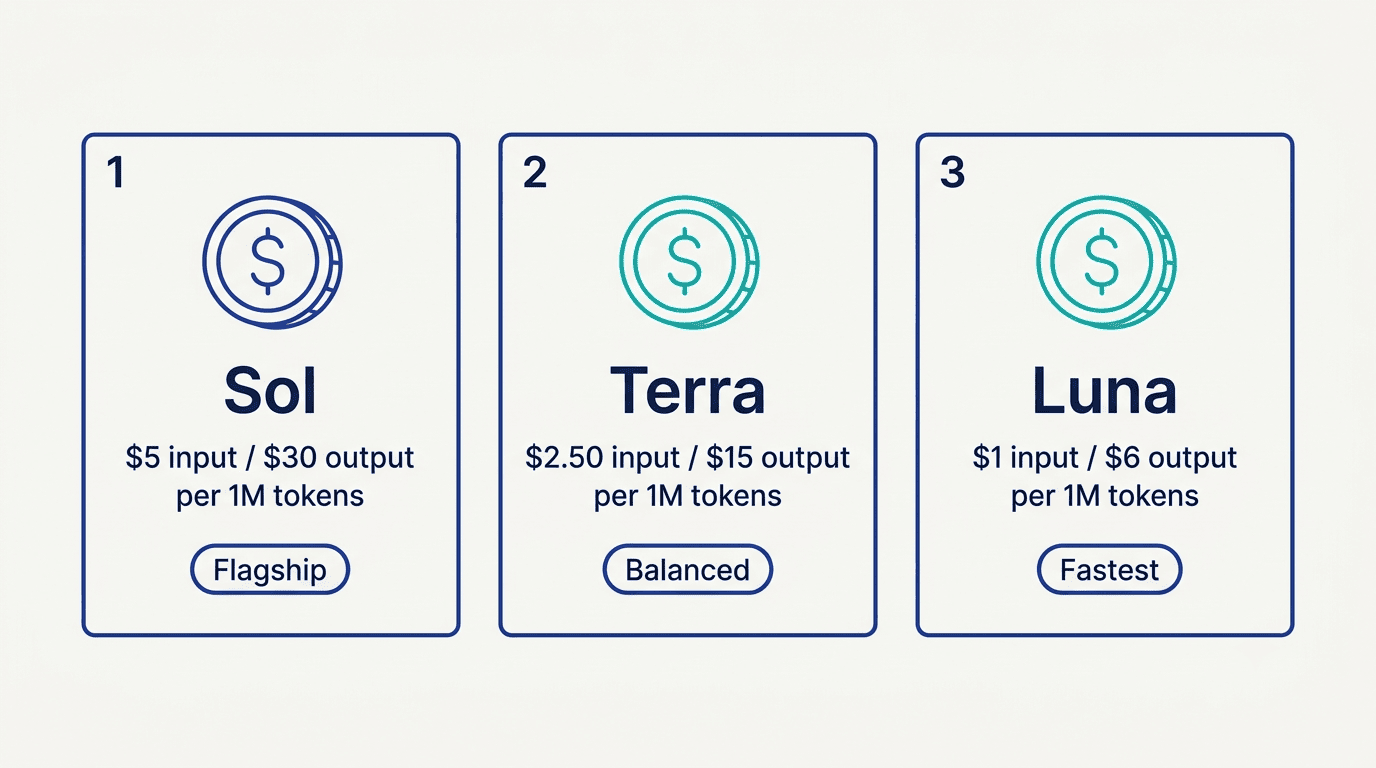
Pricing is tiered by model and by context length. Requests above 272,000 input tokens cross into a long-context pricing band.
Standard API pricing (short context, per 1M tokens)
| Model | Model ID | Input | Output |
|---|---|---|---|
| GPT-5.6 Sol | gpt-5.6-sol or gpt-5.6 | $5.00 | $30.00 |
| GPT-5.6 Terra | gpt-5.6-terra | $2.50 | $15.00 |
| GPT-5.6 Luna | gpt-5.6-luna | $1.00 | $6.00 |
Long-context pricing (above 272K input tokens)
| Model | Long-context Input | Long-context Output |
|---|---|---|
| GPT-5.6 Sol | $10.00 | $45.00 |
| GPT-5.6 Terra | $5.00 | $22.50 |
| GPT-5.6 Luna | $2.00 | $9.00 |
The 2x input / 1.5x output multiplier applies to the entire request once the 272K threshold is crossed — not just the tokens above the threshold.
Prompt caching
Prompt caching is supported across all three models via the Responses API:
- Cache writes: billed at 1.25x the uncached input rate
- Cached reads: 90% discount off the standard input rate
- Minimum cache lifetime: 30 minutes
On workflows with long, repeated system prompts or reference documents, the 90% cached-read discount substantially reduces effective cost per request after the first call. For a Sol workload running 1,000 requests against a 100K-token cached system prompt, the cached-read discount drops the effective input cost from $500 to approximately $50 for that cached portion.
For current and updated pricing figures, check the OpenAI API pricing page directly.
How to Access GPT-5.6 in ChatGPT, Codex, and the API
Access varies significantly by product surface. The key distinction that catches most users off-guard: GPT-5.5 Instant remains the everyday default in standard ChatGPT. GPT-5.6 Sol appears through reasoning settings on paid plans, not as the primary chat model.
Access by surface
| Product surface | GPT-5.6 access |
|---|---|
| Standard ChatGPT (Free, Go, logged-out) | No GPT-5.6 access |
| Standard ChatGPT (Plus, $20/mo) | Sol via Medium/High reasoning settings |
| Standard ChatGPT (Pro, $200/mo) | Sol via Extra High and Pro reasoning settings |
| ChatGPT Work | Sol, Terra, and Luna (Plus, Pro, Business, Enterprise) |
| Codex (Free / Go plans) | Terra only |
| Codex (Plus, Pro, Business, Enterprise) | Sol, Terra, and Luna; max and ultra available |
| OpenAI API | Sol, Terra, and Luna via explicit model IDs |
| Microsoft Copilot 365 | GPT-5.6 Sol as preferred model |
Terra and Luna are not selectable in standard ChatGPT conversations regardless of plan. They are accessible through the Codex coding agent, ChatGPT Work, and the API. For developers integrating GPT-5.6 into pipelines, see how OpenAI Programmatic Tool Calling works with all three tiers.
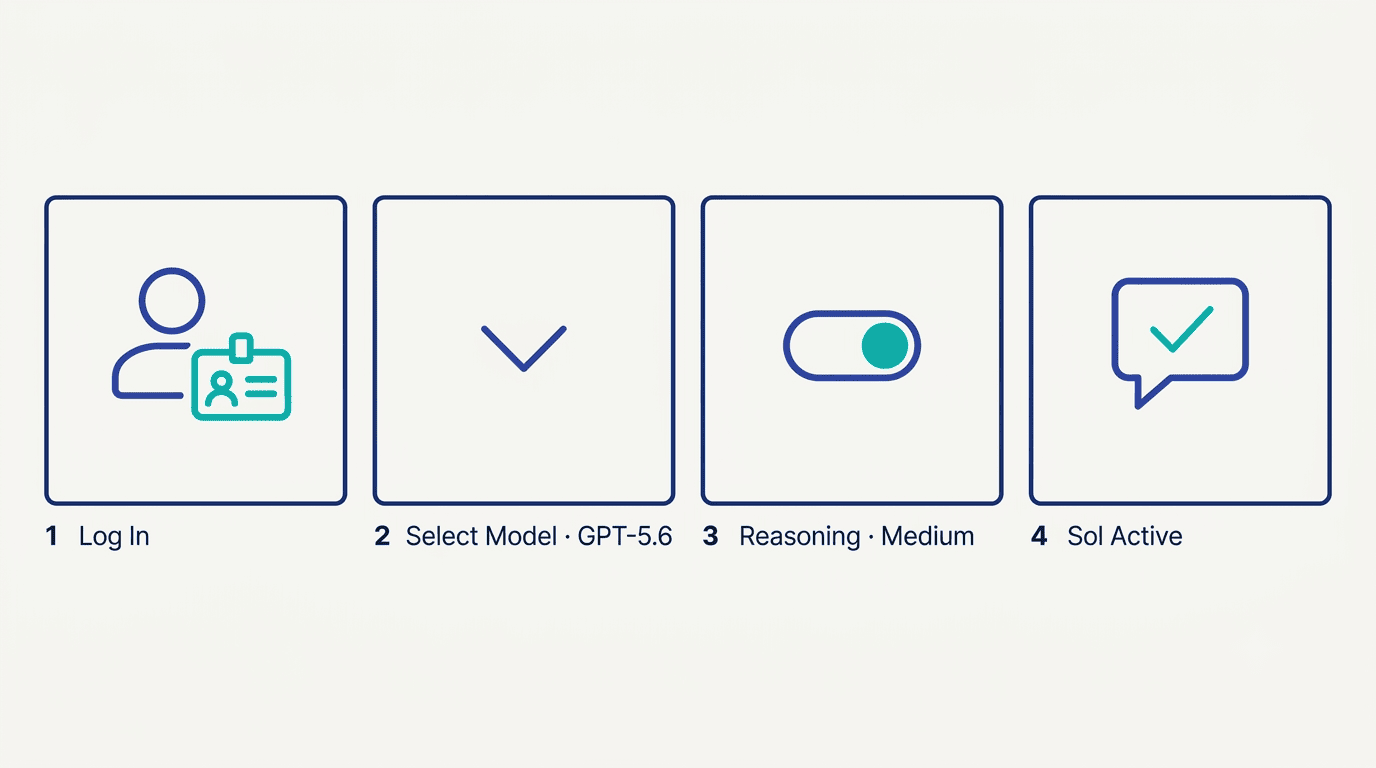
How to switch to GPT-5.6 Sol on ChatGPT Plus — step by step
- Log in to ChatGPT with a Plus, Pro, Business, or Enterprise account.
- Open a new conversation.
- Click the model selector dropdown at the top of the chat window.
- Select GPT-5.6 or navigate to Reasoning settings.
- Choose Medium or High reasoning effort to activate Sol.
- For
ultramode, switch to Codex (accessible from the ChatGPT Work interface or the sidebar) and select Ultra effort. - For API access, set
model: "gpt-5.6-sol"(or"gpt-5.6-terra"/"gpt-5.6-luna") in your request parameters.
Cerebras-hosted Sol
OpenAI is launching GPT-5.6 Sol on Cerebras infrastructure at up to 750 tokens per second for latency-sensitive workloads. This is initially available to select customers as capacity expands — the combination of Sol’s quality and Cerebras throughput is aimed at real-time agentic applications where response lag breaks the user experience.
GPT-5.6 Safety, Preparedness Framework, and Government Coordination
Safety evaluation for the GPT-5.6 family was more extensive than for any prior OpenAI release. The full documentation is published in the GPT-5.6 Preview System Card on OpenAI’s Deployment Safety Hub.
Under OpenAI’s Preparedness Framework, all three models received identical risk designations:
- High in Biological and Chemical risk
- High in Cybersecurity
- Below High in AI Self-Improvement
This marks the first time that Terra and Luna — smaller, faster members of a model family — received a High designation in any Preparedness-tracked category. Prior releases typically reserved High ratings for the largest flagship models only.
Red-teaming at scale
OpenAI dedicated over 700,000 A100-equivalent GPU hours to automated red-teaming aimed at finding universal jailbreaks — attacks that generalize across prompts and contexts rather than exploiting specific phrasing. Automated red-teaming continues during live deployment, not just in pre-launch testing.
The cybersecurity findings illustrate why the models received a High designation. GPT-5.6 Sol saturates the internal Capture-the-Flag evaluation at 96.7%. On FrontierCyber, Sol scores 11% Easy, 12% Medium, 5% Hard, and 0% Elite. Sol and Terra can identify vulnerabilities and compose pieces of exploits, but were unable to carry out autonomous end-to-end attacks against hardened targets in testing — the basis for classifying them as High rather than Critical in cybersecurity.
Layered safety stack
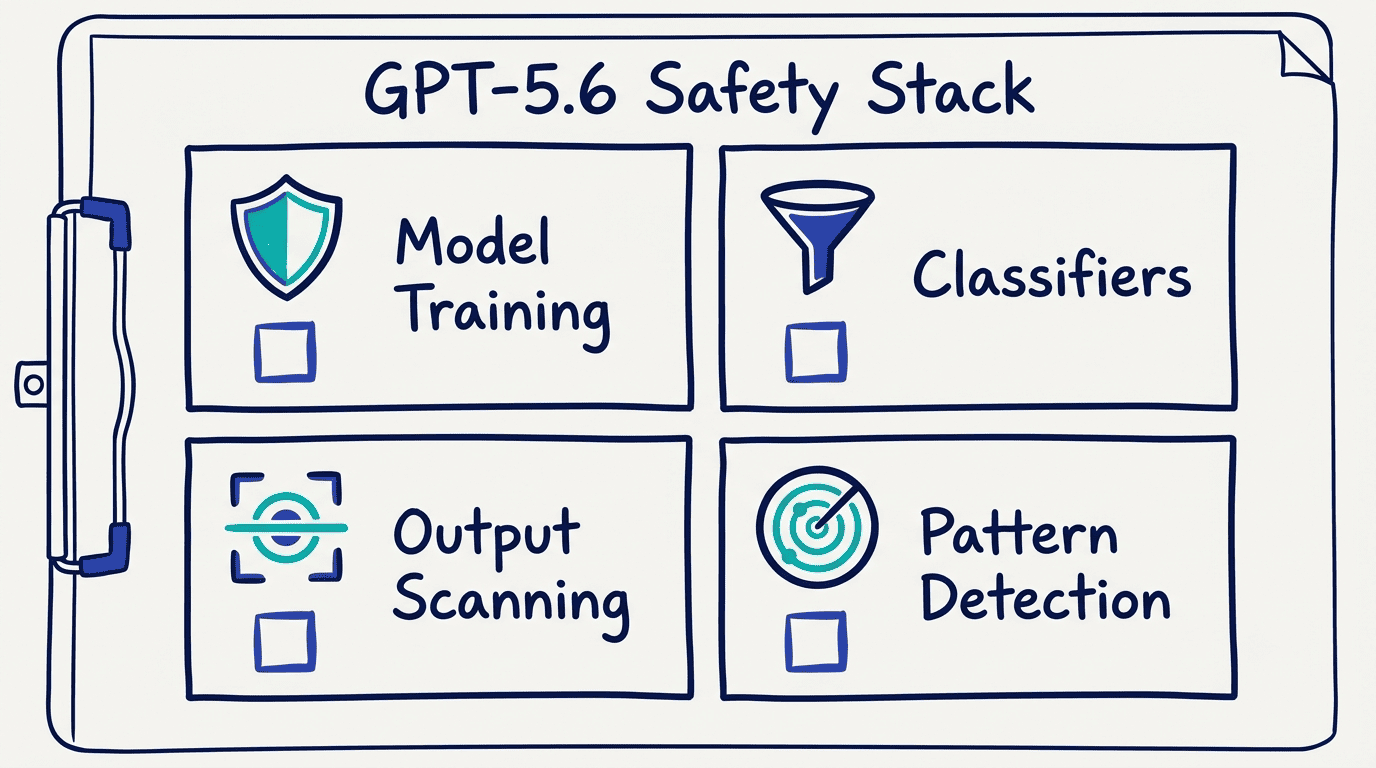
OpenAI describes the defense-in-depth approach for GPT-5.6 across several layers:
- Model-level safety training baked into all three tiers
- Activation classifiers on Sol and Terra that can intervene during generation
- Real-time output scanning on the API serving layer
- Automated pattern-detection across conversation streams
The framework argues that severe harm requires a chain of successful steps, and safeguards placed at multiple points in that chain reduce end-to-end risk even when individual layers are imperfect.
ChatGPT Work: GPT-5.6 for Enterprise Teams
ChatGPT Work launched on July 9, 2026 — the same day as GPT-5.6 general availability — and is powered by GPT-5.6 Sol. It is OpenAI’s agentic assistant for workplace teams, built to automate multi-step tasks across files, apps, and workflows rather than answer individual questions.
At launch, 5+ million users were using Codex weekly, with 1+ million using it beyond software development. The new unified ChatGPT desktop app for Mac and Windows replaces the legacy Codex app (the legacy app is now renamed ChatGPT Classic).
Key capabilities
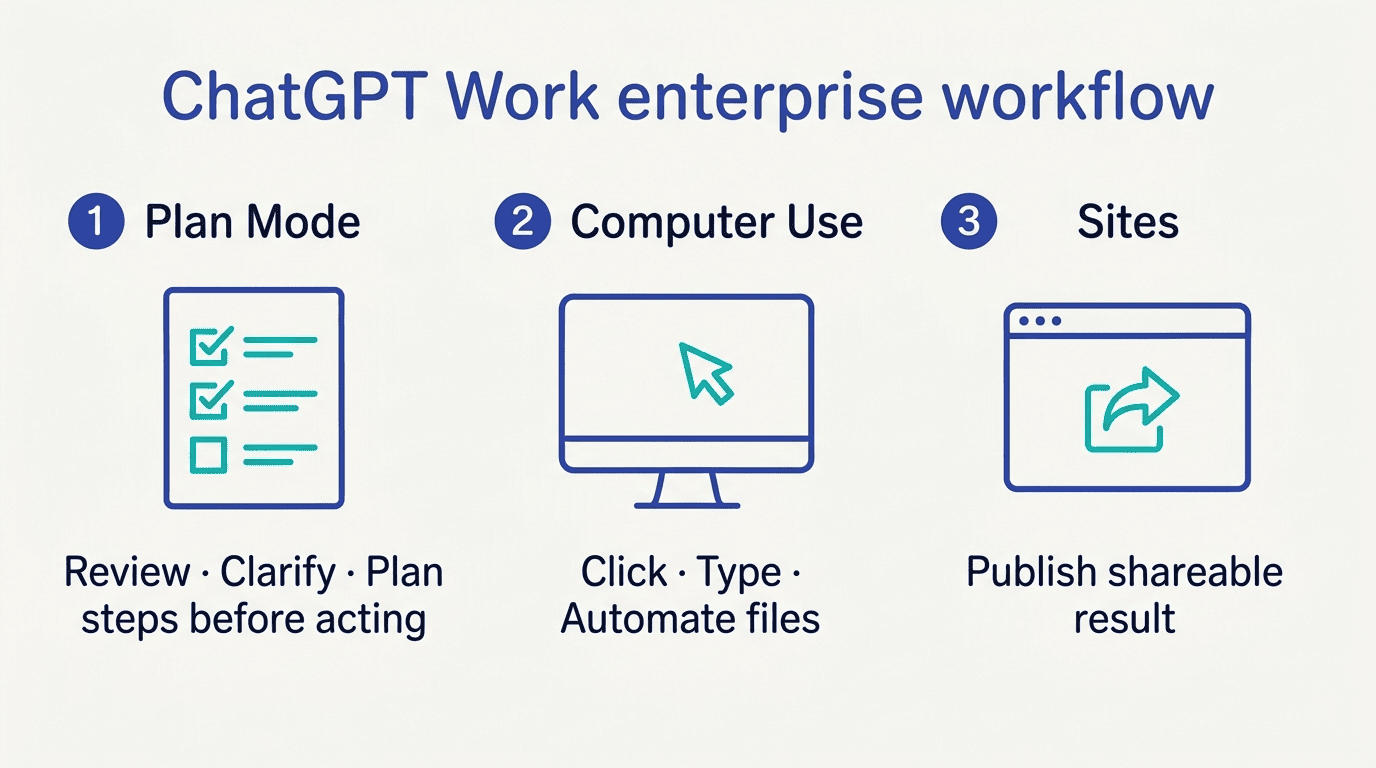
Plan Mode changes how ChatGPT approaches complex requests. Instead of executing immediately, the assistant gathers context, asks clarifying questions, creates a step-by-step plan, and only then begins execution. This reduces silent failures in long agentic workflows.
Computer Use lets ChatGPT click, type, and manage files across desktop applications on the user’s behalf — without requiring the user to set up browser automation or shell scripts.
Sites (beta) converts completed work — reports, dashboards, research summaries — into shareable, interactive web applications that non-technical stakeholders can open without special tooling.
Scheduled Tasks handles one-time or recurring workflows that execute offline, appropriate for batch processing, overnight reports, and monitoring tasks.
Plugin integrations cover 1,400+ services including Slack, Microsoft Teams, Google Drive, SharePoint, email, calendars, and CRMs.
ChatGPT Work pricing
| Plan | Price |
|---|---|
| Free | $0/month |
| Plus | ~$20/user/month |
| Pro | $200/user/month |
| Business / Team | $20/user/month (annual) or $25 monthly |
| Enterprise | Custom pricing |
ChatGPT Work competes directly with Anthropic’s Claude Cowork and Microsoft Copilot Cowork for the enterprise AI assistant market. See full feature and pricing details in the ChatGPT Work enterprise guide.
GPT-5.6 vs GPT-5.5: What Actually Changed?
GPT-5.5 Instant remains the default for fast responses in standard ChatGPT. GPT-5.6 is not a straight replacement — it is a parallel expansion that adds a three-tier structure alongside existing models. The practical differences for developers and teams:
| Area | GPT-5.5 | GPT-5.6 |
|---|---|---|
| Model structure | Single model | Three tiers: Sol, Terra, Luna |
| Coding efficiency | Baseline | Sol is 54% more token-efficient (Sam Altman) |
| Agents’ Last Exam | 46.9% | Sol: 52.7% |
| Reasoning controls | Standard | max (deep single-agent) and ultra (parallel subagents) |
| Context window | Varies | 1.05M tokens (all three GPT-5.6 models) |
| Pricing (comparable tier) | GPT-5.5 rate | Terra at approximately half GPT-5.5 price |
| Multi-agent orchestration | Limited | Beta via Responses API; ultra mode in Codex |
| Prompt caching | Basic | Cache breakpoints, 30-min minimum lifetime, 90% cached-read discount |
| Programmatic Tool Calling | Not available | Coordinates tools; processes results in-memory |
The most significant practical change for API developers is prompt caching behavior: the new 90% discount on cached reads makes long system prompts economical at scale in a way they were not under GPT-5.5’s caching implementation.
FAQ
What is ChatGPT 5.6?
ChatGPT 5.6 — formally GPT-5.6 — is OpenAI’s newest model generation, released for general availability on July 9, 2026. It is a family of three models: GPT-5.6 Sol (flagship), GPT-5.6 Terra (balanced), and GPT-5.6 Luna (fast and affordable). The common search terms Chat GPT 5.6, GPT 5.6, and Generative Pre-trained Transformer 5.6 all refer to the same family.
What are the differences between GPT-5.6 Sol, Terra, and Luna?
Sol is the flagship model for hard reasoning, coding agents, cybersecurity, and high-value work — priced at $5 input / $30 output per 1M tokens. It is the only tier that supports max and ultra reasoning modes. Terra is the balanced everyday tier, competitive with GPT-5.5 at roughly half the cost ($2.50 input / $15 output). Luna is the fastest and most affordable option for high-volume pipelines ($1 input / $6 output). All three share a 1.05M-token context window and a February 16, 2026 knowledge cutoff.
How much does GPT-5.6 cost via the API?
Standard short-context pricing per 1 million tokens: Sol costs $5 input / $30 output; Terra costs $2.50 input / $15 output; Luna costs $1 input / $6 output. Requests exceeding 272,000 input tokens are billed at 2x the input rate and 1.5x the output rate for the entire request. Prompt caching offers a 90% discount on cached reads with a minimum 30-minute cache lifetime.
Can I use GPT-5.6 for free on ChatGPT?
No. Free, Go, and logged-out ChatGPT users do not get access to GPT-5.6 in standard conversations — GPT-5.5 Instant remains their default. ChatGPT Plus ($20/month) unlocks GPT-5.6 Sol through the Medium and High reasoning settings. Terra and Luna are not accessible in standard ChatGPT conversations regardless of plan.
How does GPT-5.6 Sol compare to Claude Fable 5?
On the Artificial Analysis Coding Agent Index, GPT-5.6 Sol scores 80 — 2.8 points above Anthropic’s Fable 5 (77.2). Sol also uses less than half the output tokens and costs approximately one-third less than Fable 5. On Terminal-Bench 2.1, Sol scores 88.8% versus Fable 5’s 83.4%, and GPT-5.6 Sol Ultra reaches 91.9%.
Is GPT-5.6 better than GPT-5.5?
In most measured categories, yes. GPT-5.6 Sol scores 52.7% on Agents’ Last Exam versus GPT-5.5’s 46.9%. Sol is 54% more token-efficient for coding. On HealthBench Professional, Sol scores 60.5 versus GPT-5.5’s 51.8. However, GPT-5.5 Instant remains the default in standard ChatGPT and is not being deprecated — GPT-5.6 is a parallel expansion, not a direct replacement.
What is the context window of GPT-5.6?
All three models — Sol, Terra, and Luna — share a context window of 1,050,000 tokens (1.05 million), with a maximum output of 128,000 tokens. Prompts above 272,000 input tokens trigger the long-context pricing tier (2x input rate, 1.5x output rate for the entire request).
What is the knowledge cutoff date for GPT-5.6?
The knowledge cutoff for all three GPT-5.6 models is February 16, 2026. Events, publications, and data after that date are not reflected in the models’ training.
Is GPT-5.6 available for ChatGPT Plus subscribers?
Yes. ChatGPT Plus ($20/month) subscribers get access to GPT-5.6 Sol through the Medium and High reasoning settings in standard ChatGPT. Plus subscribers also get Sol, Terra, and Luna access in Codex and ChatGPT Work, subject to workspace controls.
What are max and ultra modes in GPT-5.6?
max is a reasoning-effort setting available to Sol that allocates the most compute time available to work through a difficult single-agent problem. ultra goes further by deploying multiple subagents in parallel to tackle complex multi-step tasks. GPT-5.6 Sol Ultra — the ultra variant — scores 91.9% on Terminal-Bench 2.1, compared to Sol’s 88.8% in standard mode. Both modes are available in Codex for Plus and higher plans.
Why was GPT-5.6 released in limited preview first?
OpenAI briefed the U.S. government on GPT-5.6’s capabilities before launch. At the government’s request — due to the models’ elevated cybersecurity and biological capabilities (both rated High under the Preparedness Framework) — OpenAI began with a limited preview for trusted partners on June 26, 2026, before expanding to general availability on July 9, 2026.
What is ChatGPT Work and how does it use GPT-5.6?
ChatGPT Work is OpenAI’s agentic AI assistant for workplace teams, launched on July 9, 2026. It is powered by GPT-5.6 Sol and supports multi-step task automation across files, apps, and workflows. Features include Plan Mode, Computer Use, Scheduled Tasks, Sites (beta), and 1,400+ plugin integrations. The Business/Team plan costs $20/user/month (annual).
How does prompt caching work with GPT-5.6?
Prompt caching is supported across all three GPT-5.6 models. Cache writes are billed at 1.25x the uncached input rate. Cached reads get a 90% discount off the standard input rate. The minimum cache lifetime is 30 minutes. This makes repeated long system prompts economical — on a Sol workload with a 100K-token cached system prompt, the effective input cost for cached reads drops by 90%.
What is GPT-5.6 Sol Ultra?
GPT-5.6 Sol Ultra is the ultra-mode variant of GPT-5.6 Sol. It deploys multiple subagents in parallel to handle complex multi-step tasks, trading additional compute for speed and thoroughness on difficult agentic workflows. It scores 91.9% on Terminal-Bench 2.1, compared to Sol’s 88.8% in standard mode.